Go to homepage

#statusMessage#

Do you want to start the comparison now?

Note
Select at least one product via the “Compare” function to activate the product comparison.

Boost Test Development with the Nigel AI Advisor.

Understand NI software faster with AI assistance and accelerate the development of automated test systems. Nigel is more than an AI-powered assistant – it marks the next stage in the development of intelligent test systems.

Learn More Now

What is Nigel?

  • Reliable AI advisor: Nigel is an AI-powered assistant developed specifically for test and measurement applications. It provides fast answers, helps you create code, and optimizes your test development process. With Nigel, you can use NI software like a professional.
  • What makes Nigel unique:
    • Optimized for test: Nigel was developed using extensive test expertise and measurement data to provide reliable answers.
    • Fully integrated: Nigel is seamlessly integrated into NI software and provides support directly within the application without interrupting your workflow.
    • Built for the future: Nigel continues to evolve and becomes more capable over time, helping you make your test systems even more efficient.

Your Consultation Starts Here.
Ask Your Questions
Using Our Contact Form.

Schedule a Consultation


The Key Benefits of Nigel.

  • Faster development: Generate LabVIEW code using natural-language prompts and receive support when generating TestStand sequences. This helps you move from the task definition to the solution faster.
  • Improved code review: Nigel helps analyze program code, test sequences, and project structures, allowing you to focus on the essential tasks.
  • Higher productivity: Specific project context and tailored recommendations enable you to accelerate the test process and make informed decisions faster.

Nigel AI Advisor was developed specifically for test applications, drawing on NI’s extensive technical expertise and trusted data. Because Nigel considers your current application, project, and working context, it provides more targeted support for your specific task.
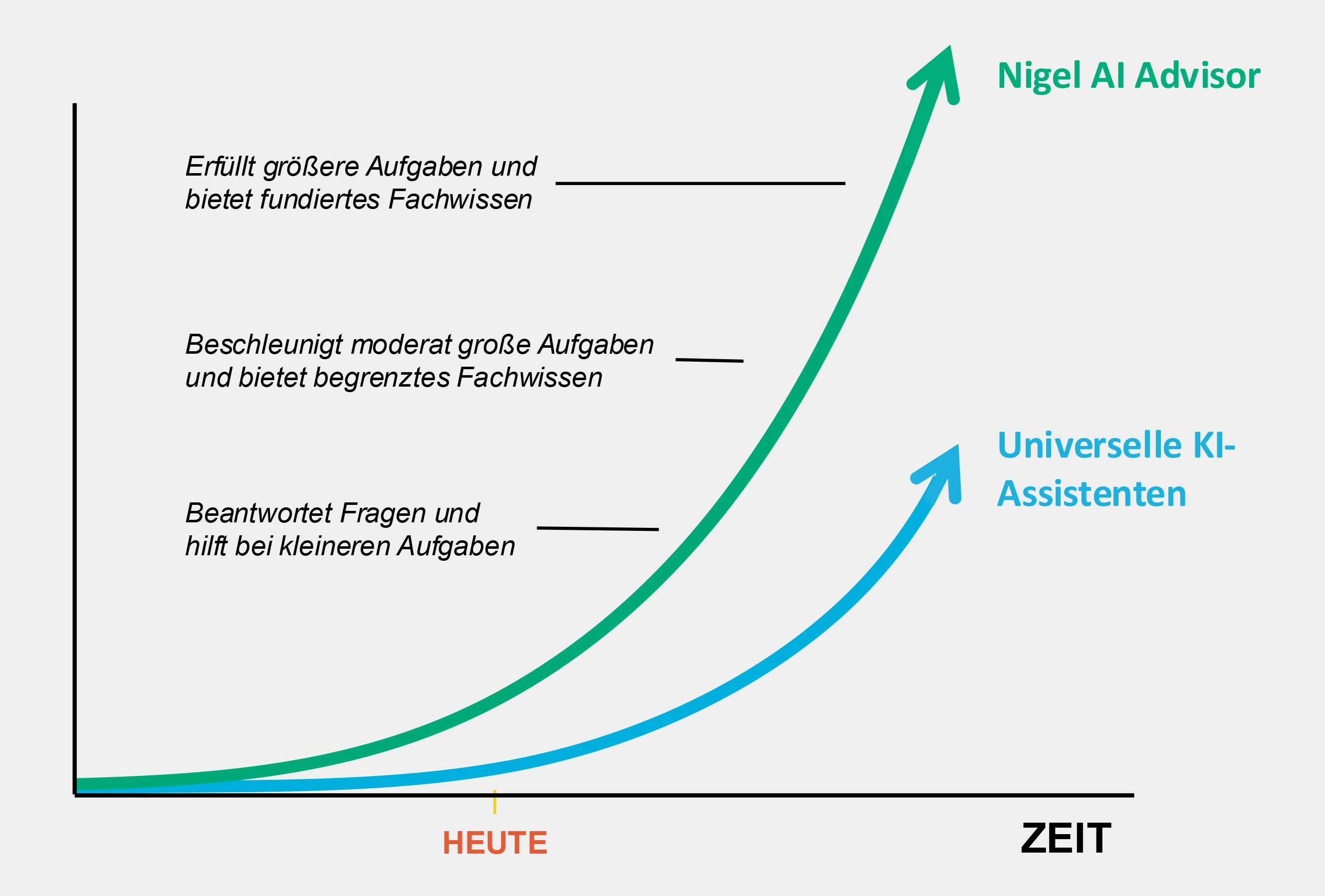
Nigel combines the latest AI models in the industry with NI test expertise.

Diagramm mit zwei ansteigenden Kurven über die Zeit: Eine grüne Kurve für „Nigel AI Advisor“ steigt deutlich stärker an als eine blaue Kurve für „Universelle KI-Assistenten“. Links sind Aufgabenstufen beschrieben, von einfachen Aufgaben bis zu komplexen A

Figure: Only in German

How Nigel Works.

  • Integrated assistance: Nigel is integrated directly into NI software and supports you within your current working environment. The AI Advisor also considers information from your open project.
  • Natural language interaction: Simply ask a question in your preferred language – Nigel understands your requirements, provides reliable answers, and suggests solutions and examples.
  • Availability: To access Nigel, you need a valid NI software license and an active software service agreement.

Ask Nigel questions about test and measurement.

  • What sampling rate should I use for my analog input channel?
  • What must be considered in strain gauge measurements?

Ask Nigel to explain NI software functions, find examples and settings, or assist with configuration. Nigel can also answer questions about NI hardware, such as connectors or pin functions, and provide information about general test and measurement procedures.


Powerful Software for your Test Management.

Say goodbye to time-consuming code searches – Nigel accelerates your test development.

NI development and application software is a core component of automated test environments. It structures individual workflows and supports test development. It also provides insight into system utilization and business data, helping you optimize the test process.

Based on prompts, Nigel can also create program code in LabVIEW and test sequences in TestStand for the hardware connected to your system. It can assign existing code modules or create placeholder code modules that you can edit to complete your tests.

Nigel AI Advisor and LabVIEW.

  • Instant analysis: Nigel analyzes program code and explains its purpose, functionality, and architecture. This improves collaboration and code reuse, allowing even experienced users to save valuable time and focus on essential development tasks.
  • Understand LabVIEW faster: LabVIEW provides a function for every requirement, but finding the right one can sometimes take time. Nigel can recommend functions, explain the rationale, and find examples. This helps you deepen your LabVIEW knowledge while accelerating development.
  • Generate code from prompts: Describe the required function in natural language. Nigel can generate LabVIEW code from your description and further develop it based on your existing project.
  • Optimized workflow: Nigel AI is also integrated into the LabVIEW+ Suite. The suite combines LabVIEW with NI’s leading test software to accelerate testing in validation and production: TestStand, DIAdem, FlexLogger, and InstrumentStudio.

To the LabVIEW Portfolio

Ask Nigel questions about LabVIEW.

  • What is a Case Structure?
  • What types of loops are there in LabVIEW?
  • Tell me something about finite state machines.

Nigel AI Advisor and TestStand.

  • Manage settings quickly: Nigel is trained to explain TestStand concepts and functions, helping you make the right decisions faster. Nigel can open menus for you and find, manage, and change settings. This enables you to configure TestStand like a professional.
  • Create test sequences: Describe the required test workflow in natural language to develop and structure sequences, modify models, manage settings, or monitor performance. Ask Nigel to review and start your sequence execution. This allows you to interact with TestStand using natural language.

To the TestStand Portfolio

Ask Nigel questions about TestStand.

  • How can I save results?
  • What is tracing?
  • How can I optimize this test sequence?

Nigel AI Advisor & FlexLogger.

  • Review projects more effectively: Nigel analyzes open FlexLogger projects and helps you understand measurement channels, settings, and existing configurations more quickly. The Advisor explains relationships within the project context, enabling you to review a measurement task more efficiently and continue working on it in a targeted manner.
  • Configure settings faster: Nigel helps you find the appropriate functions and settings for your measurement task. The Advisor guides you to the relevant configuration areas and explains how parameters can be adjusted. This enables you to set up FlexLogger projects faster and implement changes with greater confidence.

To the FlexLogger Portfolio

Ask Nigel questions about FlexLogger.

  • Which settings are suitable for this measurement task?
  • Where can I find the data logging settings?
  • Explain the structure of this FlexLogger project?

Nigel AI Advisor & InstrumentStudio.

  • Configure PXI systems faster: Nigel supports you in selecting and configuring the instruments used. The Advisor helps you find relevant settings and explains their significance for the respective measurement task. This helps you move more quickly from connected hardware to a measurement configuration that is ready for use.
  • Understand hardware and measurements better: Nigel answers questions about connected NI PXI instruments and their functions. At the same time, the Advisor explains measurement parameters and relationships within the current application. This facilitates onboarding and helps you prepare and evaluate measurements on a more informed basis.

To the InstrumentStudio Portfolio

Ask Nigel questions about InstrumentStudio.

  • Which hardware should I use for this measurement?
  • List the specifications of my oscilloscope.
  • How do I export my configuration to TestStand?

Nigel AI Advisor & VeriStand.

  • Understand VeriStand faster: Nigel provides technical support when getting started with VeriStand and answers questions about functions, concepts, and typical workflows. This helps you find your way around more quickly and use the software more effectively.
  • Develop simulation sequences more efficiently: Nigel provides technical guidance when building simulation sequences for your real-time and HIL tests. The Advisor helps you understand functions and procedures more clearly and implement the individual steps in a structured manner.

To the VeriStand Portfolio

Note:
Nigel will continue to evolve and become more intelligent over time. This does not require an update to your LabVIEW or TestStand version. The AI models are trained in the backend so that you remain connected to your system and become increasingly efficient.


Important User Questions (FAQ).

Is the Nigel AI Advisor secure?

According to NI, Nigel was designed for use in enterprise environments and uses modern AI models operated on a Microsoft Azure infrastructure. The implemented security and data protection measures follow the standards customary for enterprise software.


Are my data stored or reused?

As of the current status (01/2026), Nigel processes user inputs exclusively to provide an immediate response to the respective request. No storage or reuse of content by NI (Emerson) takes place unless data are actively transmitted by the user for support or feedback purposes. In this case, explicit user consent is required.


Does NI (Emerson) have access to my inputs?

NI (Emerson) does not receive automatic access to user inputs or conversation content unless these are expressly transmitted by the user as part of support requests or feedback.


Can Nigel be deactivated?

Yes, Nigel is an optional feature and can be deactivated at any time.


Does Nigel also support existing or older projects?

Yes, Nigel can support the analysis and understanding of existing projects, for example when working with code from other developers. Nigel is available in current versions of LabVIEW and TestStand (from LabVIEW 2025 Q3 and TestStand 2025 Q3).


What added value does Nigel offer for experienced users?

Experienced software users can also benefit from Nigel, for example through AI-powered generation of code and test sequences, faster analysis of existing projects, and support with complex settings and configurations. The current focus is on supporting new users; however, the range of functions is continuously being expanded.


How do I obtain access to Nigel?

To access Nigel, you need a valid license for NI software and an active software service agreement. Software service is included with single-seat licenses, both subscription and perpetual licenses, as well as volume license agreements and enterprise agreements. Access is provided directly through the software user interface.
NI Seminars.

As an authorized NI training partner for seminars and hands-on training, we offer consulting and professional development all under one roof. We provide introductory and advanced courses led by certified instructors on LabVIEW, TestStand, NI-DAQmx, DIAdem, and more. Courses are available for beginners and professionals in English or German.

Deepen your knowledge of NI measurement technology and learn alongside others who share your professional interests.

Find the Right Seminar


Contact Us Now.
Simply Send Us Your Inquiry Using Our Contact Form.

Request a Offer